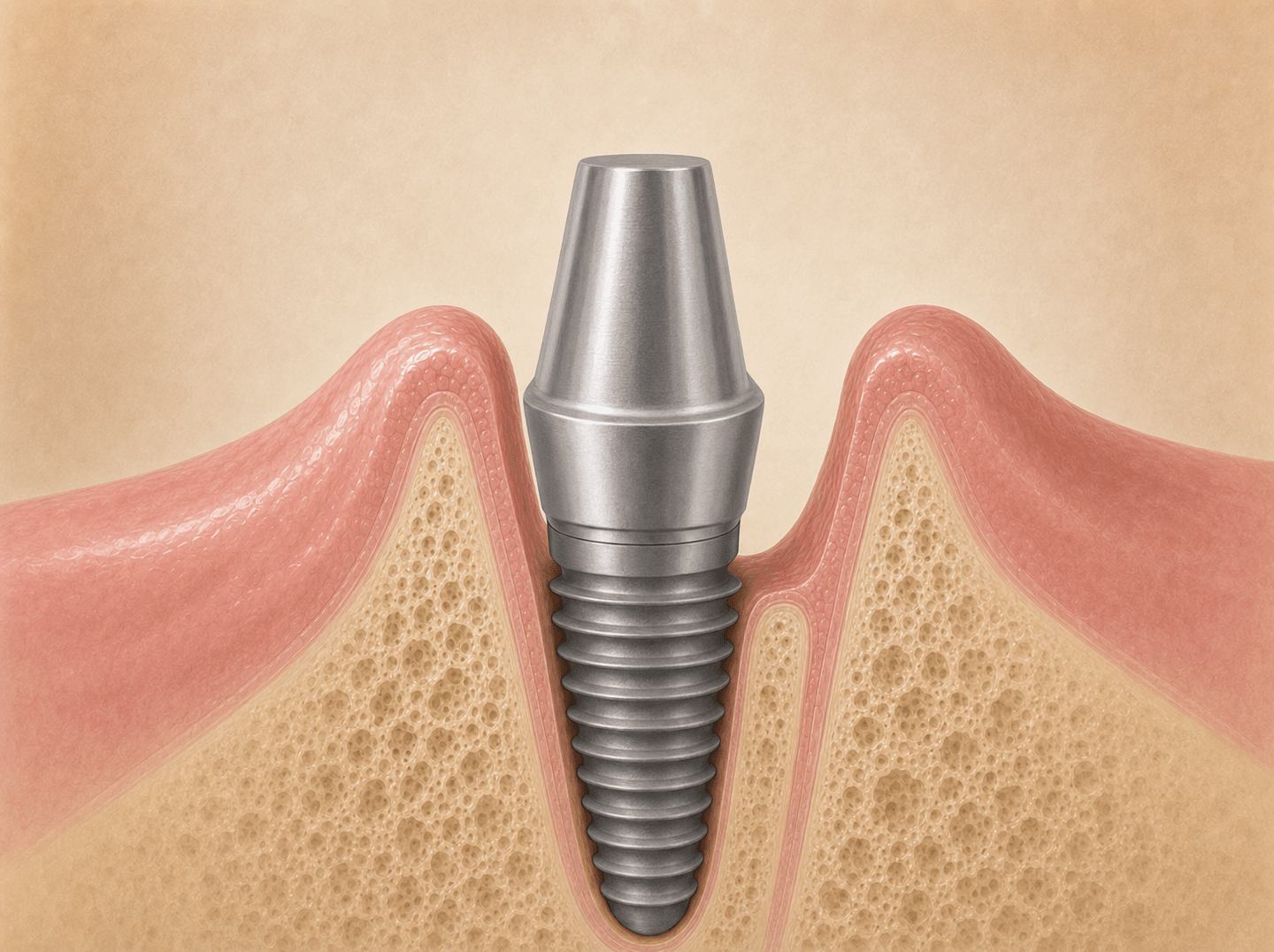
D6056 is the CDT code for a stock implant abutment, the off-the-shelf component that connects the implant fixture to the restoration, with any chairside trimming and the seating visit folded into the one code.
Nearly every billing problem on D6056 traces back to the custom-versus-prefabricated code question — D6056 vs D6057 — and proving which one was actually placed.
On this page
What D6056 covers
D6056 reports a stock implant abutment, with any chairside modification and the seating visit included in the code. The abutment is a component selected from the implant manufacturer’s catalog, then seated on the implant fixture to connect it to the planned restoration. The descriptor folds the modification into the code, so trimming the abutment to height, adjusting the margin, or contouring it at the chair is part of D6056, not a separate charge.
It does not cover:
- Custom-fabricated abutments designed for the patient’s case from a scan or impression. Use D6057.
- The implant fixture itself. Use D6010 for the surgical placement of the implant body.
- The crown or restoration seated on the abutment. Use D6058 (porcelain or ceramic), D6059 (PFM high noble), D6060 (PFM predominantly base), D6061 (PFM noble), and the related crown codes.
- Implant-supported crowns that attach directly to the implant with no separately billable abutment. Use D6065, D6066, or D6067 depending on material.
- Repair or replacement of part of an abutment. Use D6095 (by report).
- The healing abutment or healing collar placed during the healing phase. That’s part of the surgical workflow, not D6056.
The defining feature is that the abutment came off the shelf. If it was designed for this patient, the code is D6057.
When to bill D6056
Bill D6056 when:
- A stock abutment has been selected from the manufacturer’s catalog for the patient’s implant.
- The abutment has been placed on the implant fixture and torqued to specification.
- Any modification was done chairside (height reduction, margin adjustment), not through a patient-specific lab design.
Do not bill D6056 for:
- Custom abutments designed and fabricated for the patient’s case. Use D6057.
- The implant placement or the crown.
- A stock abutment used only as a temporary healing component with no restoration planned on it.
What separates D6056 from D6057
The custom-versus-prefabricated distinction is the main billing question in the abutment family. It turns on whether the abutment was designed for this patient or selected from inventory, not on whether it was adjusted at the chair.
Prefabricated (D6056) indicators:
- Stock abutment pulled from the implant manufacturer’s catalog.
- Selected by clinical judgment to fit the case, but not designed for it.
- Modified chairside if needed. The modification is already included in D6056.
- Documented as “prefab” or with a catalog SKU in the chart or lab note.
Custom (D6057) indicators:
- Digital scan or impression workflow with a CAD design specific to the patient.
- Lab work order describing the patient-specific design parameters (angulation, emergence profile, soft tissue contour).
- Machined or printed to that design rather than selected from a shelf.
A stock abutment that gets trimmed chairside and then a custom crown seated on top is still D6056 for the abutment. The custom design is on the crown, not the abutment. Coding it as D6057 to capture the higher allowable is a misrepresentation the carrier can catch at audit, because there’s no lab design to support it.
Top reasons D6056 gets denied or downgraded
Five issues account for most problems on this code:
- Implant placement not in claims history. The carrier can’t find a D6010 for the patient. Documentation of the placement date resolves it. Common when a different provider placed the implant.
- Coverage exclusion on implants. The plan excludes implant restorations entirely or pays them at a bridge allowable. The exclusion reaches the abutment as part of the implant restoration. Verify before treatment planning.
- Bundled with the crown. A small number of plans bundle the abutment into the crown benefit and pay a single allowable for the pair. The denial reads as “inclusive to” the crown.
- Billed on the same date as D6010. D6056 on the implant placement date raises an immediate-load question. Most cases place the abutment months after the implant. Same-date billing needs immediate-load documentation.
- Code mismatch with the documentation. D6056 billed when the chart and lab work clearly describe a custom abutment, or D6057 billed with no design documentation. The carrier pays the code the records actually support.
The downgrade question runs the other direction
On most codes the downgrade pressure is from a higher allowable to a lower one. D6056 is usually the downgrade target, not the code being downgraded. When a plan applies an alternate-benefit clause to a custom abutment (D6057), it pays at the D6056 prefabricated allowable, and the patient owes the difference. See the D6057 page for that math.
For D6056 itself, the more common patient-responsibility surprise is the plan’s overall implant restriction: an exclusion or a bridge-allowable cap that the practice didn’t catch at treatment planning.
Documentation that supports the claim
The claim needs:
- Date of service (the abutment placement date).
- Tooth number or implant location.
- Implant brand and platform (some carriers require this on the claim form).
For the patient record, document:
- Implant placement date and the healing period before abutment placement.
- Abutment type (prefabricated, stock) and the catalog reference if available.
- Any chairside modification performed.
- Torque value at seating.
- Soft tissue management at seating (healing collar removal, tissue contour).
- Connection to the provisional or final restoration.
A chart note that records the abutment as prefabricated, with the catalog reference, keeps the claim consistent with the code and prevents the carrier from questioning whether a custom abutment was billed as prefab or the reverse.
D6056 versus the implant-supported crown codes
D6056 exists because the restoration uses a separate abutment. When the case uses no separate abutment (a one-piece crown attached directly to the implant body), there is no D6056 line at all, and the crown carries an implant-supported code: D6065 for porcelain or ceramic, D6066 for porcelain fused to metal, D6067 for full metal. The presence or absence of the D6056 (or D6057) line is what tells the carrier whether the case was abutment-supported or implant-supported.
Example case
A 58-year-old patient had an implant placed on tooth #30 (lower right first molar) by a periodontist four months ago. The implant is integrated. The general dentist selects a stock titanium abutment from the manufacturer’s catalog, reduces the height slightly at the chair to clear the opposing occlusion, and torques it to specification. A porcelain crown is planned for a later visit.
Treatment sequence:
- Visit 1 (four months ago): D6010 placement at the periodontist’s office.
- Visit 2 (today at the GP): stock abutment selected, trimmed chairside, seated and torqued.
- Visit 3 (later): final crown delivered.
Billing steps:
- Verify benefits and confirm implant restoration coverage. Pull the carrier’s expected payment on D6056 and the crown code separately.
- Confirm the periodontist’s D6010 placement date and the implant brand. Add them to the patient’s implant record.
- Submit D6056 on the abutment placement date with tooth number 30 and the implant brand.
- Document the prefabricated designation and the chairside modification in the chart.
- Submit the crown code on its own delivery date.
If the plan covers the implant restoration, D6056 pays at the plan’s abutment allowable. If the plan excludes implant restorations, the abutment denies as part of the excluded service and the patient owes the fee, which the pre-treatment estimate should have flagged.
Implant restoration billing checks
The specifics vary across Open Dental, Dentrix, Eaglesoft, Curve, and Carestream. The steps that matter:
- Set the abutment designation at charting. The PMS should require prefabricated or custom. A workflow that defaults to one without asking produces code-mismatch denials.
- Confirm the implant placement date and brand before billing. When a different provider placed the implant, get the D6010 date from the surgical office and store it on the patient’s implant record.
- Bill on the abutment placement date. The implant placement (D6010) was a separate procedure on a separate date.
- Run pre-treatment estimates on implant cases. Plan-specific implant rules make implant restoration the procedure category with the largest patient-responsibility surprises.
- Keep the chairside-modification note in the chart. It documents that the modification included in D6056 was performed, and it confirms the abutment was stock rather than custom.
If your office sees recurring D6056 denials, the cause is usually a missing implant placement record or a plan-side implant exclusion. Confirming the D6010 date and the plan’s implant rules before the abutment visit prevents most of them.
FAQs
- What's the difference between D6056 and D6057?
- D6056 is a prefabricated abutment: a stock component selected from the implant manufacturer's catalog and placed, with chairside modification if needed. D6057 is a custom-fabricated abutment: designed and machined or printed specifically for the patient's implant position, soft tissue profile, and planned restoration. The axis is stock versus patient-specific design, not whether the abutment was adjusted at the chair. A stock abutment trimmed chairside is still D6056.
- Does chairside modification turn a D6056 into a D6057?
- No. Reducing height, adjusting the margin, or trimming a stock abutment at the chair is the modification that D6056 already includes in its descriptor. The case becomes D6057 only when the abutment was designed for this patient from a scan or impression, not selected from inventory. Carriers reviewing a custom claim look for lab design documentation, not chairside adjustment notes.
- Is the implant crown billed separately from D6056?
- Yes. D6056 covers the abutment only. The restoration seated on the abutment is a separate code: D6058 for porcelain or ceramic, D6059 for PFM with high noble metal, and so on. The two codes bill on the same case but represent separate procedures, usually on separate dates of service.
- Why was D6056 denied for missing implant placement history?
- The carrier looks for a prior implant placement (D6010) in the patient's claims history and can't find one. The abutment is being billed without an implant on record. Documentation of the placement date, whether from the chart, prior carrier records, or the surgical center, usually resolves this. This is common when the implant was placed by a different provider.
- Are prefabricated abutments covered when the plan covers implants at all?
- Coverage is plan-dependent. Some plans cover implant restorations and pay the abutment per the plan's allowable. Some exclude implant restorations entirely and deny the abutment as part of the excluded service. A few apply a bridge or denture allowable instead. Verify implant restoration coverage before treatment planning, not after the crown is seated.
Related codes
Need help billing this code?
We handle D6056 claims daily.
If your team is spending time on denials, narratives, or carrier follow-up for this code, our outsourced dental insurance billing service can take it off your plate. We work inside your PMS and post payments the same week.
CDT codes are maintained by the American Dental Association. This page is an editorial billing guide, not the official ADA code descriptor. Verify current coverage policies with each carrier before submitting claims.